



When you are working alone, time tracking can feel optional. You know where the day went because you were there. You remember which job ran long, which client changed the plan, and which task ate up the afternoon.
That changes fast when you start growing.
As soon as you add helpers, subcontractors, multiple jobs, or a bookkeeper, your memory is no longer a system. You need a simple way to know where time went, what jobs actually cost, and whether the business is getting more organized or just busier.
This guide is for small construction and trades businesses that are past the "it's just me and a notebook" stage, but not trying to run like a giant GC. Here is how to make time tracking useful without turning it into another admin job.
Why time tracking matters more as you grow
Most owner-operators start tracking time for payroll. That is valid, but it is only the first layer.
Good time tracking helps you answer questions that affect profit:
- Did the job take the labor hours we estimated?
- Are we losing time on setup, cleanup, pickups, or rework?
- Which crew member or subcontractor was on site?
- Are we billing change work properly?
- Is one type of job consistently slower than expected?
- Do we have enough labor capacity to take on the next project?
When the business is small, you can survive without clean answers. As the business grows, bad time data shows up as bad pricing, messy payroll, weak scheduling, and margins that disappear after the invoice goes out.
The growth stage where spreadsheets stop working
There is nothing wrong with starting in a spreadsheet. For one person, it can be enough.
The problem starts when time entries depend on everyone remembering to text you at the end of the day. One person sends "8 hours at Maple." Another sends "7.5 plus pickup." Someone forgets until Friday. Then you spend your evening piecing together the week from texts, receipts, and memory.
That usually means you have outgrown the spreadsheet.
Common signs:
- You have two or more people submitting hours
- You are running multiple active jobs in the same week
- You are paying hourly workers or subs from reported time
- You are guessing how many hours are left on jobs
- You are unsure if the estimate was wrong or the job just ran poorly
- Payroll takes more than 30 minutes of chasing
If any of those are true, the issue is not discipline. The system is too loose for the size of the business.
Track the few things that actually matter
You don't need to track every tiny movement. Most small trades businesses should keep it simple at first.
Start with these:
1. Jobsite time
Track when people arrive and leave each site. This is the base layer. It helps with payroll, job costing, and schedule accuracy.
For project-based work, jobsite time is more useful than a generic "worked 8 hours" entry. You need to know which job carried the labor.
2. Travel and pickups
Material runs, supplier pickups, and travel can quietly eat a job. Decide how you want to label that time:
- Part of the job
- General overhead
- Billable pickup or delivery
- Warranty or callback
Don't overcomplicate it. Just be consistent.
3. Change work
If a client adds work, the extra labor should not disappear into the original estimate.
Create a habit: when work changes, note it the same day. Then turn that note into a proper change order or updated estimate before it becomes a payment conversation.
4. Non-billable time
Training, shop cleanup, equipment repair, internal meetings, and admin time all matter. You may not bill them directly, but they affect your real labor cost.
This is especially important when you start hiring. A crew member who is "40 hours a week" is not 40 billable hours a week.
Our recommendation: ConstructionClock for crew time

For small construction and trades teams that want automatic crew time tracking, we recommend ConstructionClock. It is built around jobsite-based time tracking, automatic clock-in and clock-out, real-time crew visibility, and payroll exports.
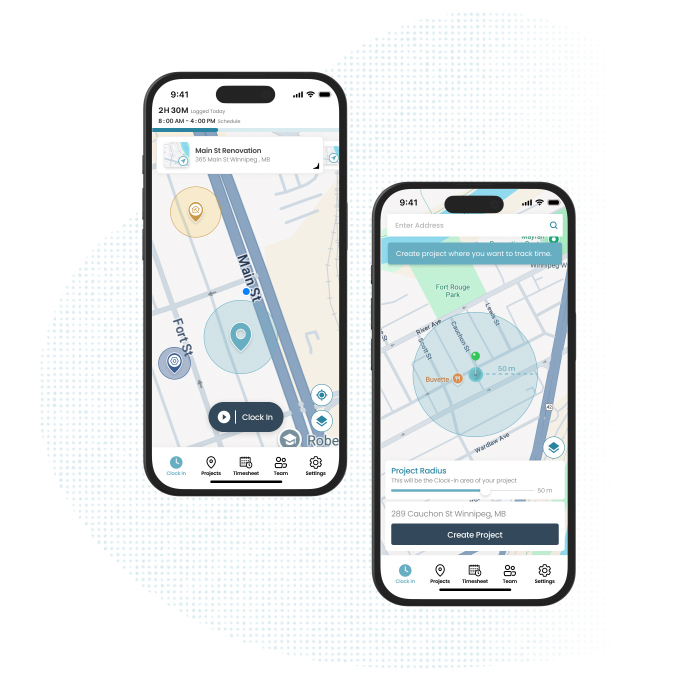
The biggest win with ConstructionClock is that it reduces the burden on the crew. If time tracking depends on everyone remembering to open an app, pick the right job, and clock out at the right time, the data will get messy.
ConstructionClock is built for the construction reality: people move between sites, forget manual clock-ins, and need something that works from the phone without a lot of babysitting. Their site highlights automatic jobsite clock-in and clock-out, real-time time tracking, and exports for payroll tools like QuickBooks, Xero, Payworks, XLSX, and PDF.
That makes it a strong fit when your main problem is crew time, payroll, and jobsite visibility.
How it fits with Dave
Time tracking should not live in a vacuum. It should connect back to how you estimate, run, and invoice jobs.
Here is the simple setup:
- Build the job estimate in Dave Estimates, including your expected labor.
- Keep the job organized in Dave Projects with notes, photos, client details, and approvals.
- Track actual crew time in ConstructionClock.
- Compare estimated labor against actual time during the job, not three weeks later.
- Use what you learned to tighten your next estimate, invoice, or change order.
Dave handles the quote-to-pay side: estimates, contracts, project notes, invoices, and client communication. ConstructionClock handles crew time and payroll visibility. Together, the workflow is simple: quote the work clearly, track the hours honestly, then improve the next job.
The key is consistency. Use the same project names across both systems. If the estimate says "Smith Basement Framing," the time tracking job should not say "Smith," "Basement," and "Framing job" in three different places.
What to review every week
Time tracking only helps if someone looks at it.
Set aside 20 minutes every Friday or Monday. Review:
- Jobs that went over expected hours
- Jobs that are trending under budget
- Days with missing or weird time entries
- Travel or pickup time that should have been planned better
- Change work that needs to be priced
- Crew capacity for the next two weeks
You are not looking for someone to blame. You are looking for patterns.
Maybe deck demo always takes longer than you estimate. Maybe electrical rough-ins are fine, but finish work is where hours drift. Maybe one crew loses half a day every week because materials are not ready.
That information is gold if you use it.
How to roll it out without annoying everyone
The mistake is turning time tracking into a lecture.
Don't start with "we need accountability." Start with the practical reason:
"We're growing, and I need cleaner job hours so payroll is easier and estimates get better. This should make less paperwork for everyone, not more."
Then make the rollout small.
Week 1: Track only jobsite time
Don't introduce 12 categories on day one. Just get clean arrival and departure times by job.
Week 2: Add travel and pickup labels
Once the basic habit works, add one or two simple labels for non-jobsite time.
Week 3: Review jobs against estimates
Pick two active jobs. Compare estimated labor to actual time. Don't overanalyze. Just ask, "Are we on track?"
Week 4: Adjust your estimating templates
If the time data shows that certain tasks always run long, update your templates or pricebook. Time tracking is only useful if it changes future decisions.
The owner-operator checklist
If you are adding time tracking this month, start here:
- Create one clear job name for each active project
- Decide what counts as job time, travel, pickup time, and admin time
- Tell the crew why you are tracking time
- Review the data once a week
- Compare actual labor against the estimate
- Price change work when it happens
- Update future estimates based on real hours
That is enough to get started.
The bottom line
Time tracking is not just a payroll chore. For a growing construction or trades business, it is one of the first real management tools you need.
It tells you whether your estimates are grounded in reality. It shows where jobs leak hours. It helps you schedule better. It gives your bookkeeper cleaner information. Most importantly, it helps you grow without losing control of the work.
If your crew time is getting hard to manage, take a look at ConstructionClock. If your estimates, invoices, approvals, and project details need a cleaner home, Dave can handle that side of the business.
Keep the system simple. Track the work. Review the numbers. Use what you learn on the next job.
Related Resources
- Contractor Labor Rate Calculator - Work out what your labor really costs
- Profit Margin Calculator - Check whether your pricing leaves enough room
- How to Write a Scope of Work for a Contractor Estimate - Make sure the labor you track connects to a clear scope
- Progress Invoicing for Contractors - Tie job progress and payments together
- Dave Invoices - Turn approved work into clean invoices